マンデルブロ集合を Rust + WebAssembly で描く
マンデルブロ集合の見た目
マンデルブロ集合(Mandelbrot Set)は、このような図形で表されます。この図の黒い部分がマンデルブロ集合です。

By Created by Wolfgang Beyer with the program Ultra Fractal 3. - Own work, CC BY-SA 3.0, Link
Show EC2 instance tags for all instances
Show EC2 instance tags from single AWS account
$ aws ec2 describe-instances | jq -r '.Reservations[].Instances[].Tags | reduce .[] as $i ({}; .[$i.Key] += $i.Value) | [.Name, .Env, .Service, .Role] | @csv'
"xxx-prod-web1",,,"web"
"xxx-prod-web2","prod","xxx","web"
"yyy-prod-web1","prod","yyy","web"
"yyy-prod-web2","prod","yyy","web"
"zzz-work",,,"ope"
"xxx-prod-batch1","prod","yyy","batch"
Show EC2 instance tags from multiple AWS accounts
$ ./run-aws-cli-on-multiple-acconts -r administrator -c "ec2 describe-instances" -j '.Reservations[].Instances[].Tags | reduce .[] as $i ({}; .[$i.Key] += $i.Value) | [.Name, .Env, .Service, .Role] | @csv'

account1 arn:aws:iam::123456789012:role/qwert-administrator-role
"xxx-prod-web1",,,"web"
"xxx-prod-web2","prod","xxx","web"
"yyy-prod-web1","prod","yyy","web"
"yyy-prod-web2","prod","yyy","web"
"zzz-work",,,"ope"
"xxx-prod-batch1","prod","yyy","batch"

account2 arn:aws:iam::234567890123:role/qwert-administrator-role
"aaa-prod-web1",,,"web"
"aaa-prod-web2","prod","xxx","web"
...
See https://github.com/takah/run-aws-cli-on-multiple-accounts for run-aws-cli-on-multiple-acconts script.
並行処理と非同期処理
並行処理と並列処理
並行処理(Concurrent Processing)
複数の処理を同時に実行すること。ただしある瞬間には1つの処理だけを実行している。シングルコアCPUで実装可能。擬似的に同時に進んでいるように見える。普通の人の頭は並行処理しかできない。
並列処理(Parallel Processing)
複数の処理を同時に実行すること。ある瞬間に複数の処理を実行している。マルチコアCPUやマルチプロセッサー、GPUなど、ハードウェアのサポートが必要。伝説によれば聖徳太子の頭では並列処理ができたようだ。
同期処理と非同期処理
通常、コンピュータプログラムは休む暇なく次から次へと処理を実行するが、どうしても休まざるを得ないこともある。代表的なのが I/O だ。ユーザーの入力を待つ、ファイルへの書き込みを待つ、ネットワーク経由でデータを取得する、タイマーの設定時間を待つなど、CPU とは桁違いに遅い処理を実行するときに待ちが発生する。
このときにじっと待つのが同期処理(Synchronous Processing)で、一時的に中断して別の処理に実行の機会を譲るのが非同期処理(Asynchronous Processing)である。
How to fix "Failed to parse the manifest file" errors on Xcode
Sometimes I encounter ununderstandable Xcode build errors. It says “Failed to parse the manifest file”, “Missing package product ‘Xxxxxxxx’, Package resolution errors must be fixed before building”. I got this error, maybe once in a month in average. This error is hard to fix and time consuming.
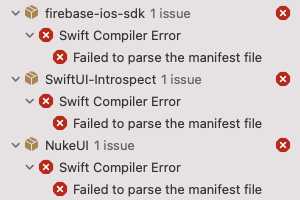
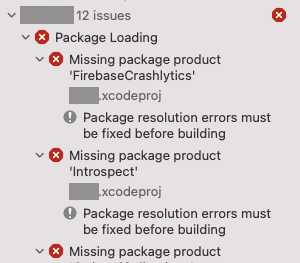
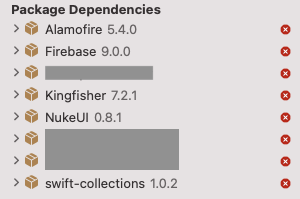
How to fix “Failed to parse the manifest file” errors (definitive)
Remove all packages and re-adding again. This should fix all the package problems! But it changes project.pbxproj file. The good news is, after you get a stable build on Xcode, you can discard the project.pbxproj changes. You do not need to commit the file to Git or other VCSs.
How to fix “Failed to parse the manifest file” errors (obsoleted)
Aug. 13, 2022 updated: This section is obsoleted.
1. Close the project.
2. Quit Xcode.
3. Remove the contents of DerivedData folders and the Cache folder.
$ rm -rf ~/Library/Developer/Xcode/DerivedData/
$ rm -rf ~/Library/Caches/org.swift.swiftpm/
4. Run xcodebuild on the project folder.
$ xcodebuild -resolvePackageDependencies -project YourProject.xcodeproj -scheme YourScheme -platform="iOS, name:'Any iOS Device'"

- You must change "YourProject" and "YourScheme" for your environment.
- "Any iOS Device" can be your real device names and your simulator names.

ex.
$ xcodebuild -resolvePackageDependencies -project Product1.xcodeproj -scheme Staging -platform="iOS, name:'iPhone X (14.5)'"
5. Open Xcode.
6. Open the project.
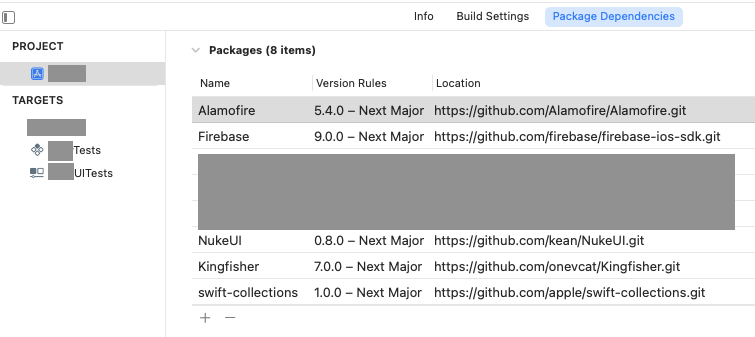
7. Last magic. Change package version rule. Small change would be fine. For example, changing minimum version requirement from 5.4.0 to 5.4.1, or changing to exact version number which is different from current package version.
References
- https://stackoverflow.com/questions/70581075/xcode-13-2-1-unable-to-resolve-swift-package-manager
Search values in Redis DB
Redis is a key-value store, so there’s no way to query values in Redis database efficiently.
One way is getting all keys by keys * and get values by get or mget one by one.
Another way, here I’ll describe in this post is, dumping all data to a file and converting it into JSON format, and find values using standard text edntir or grep or something like that.
Dump Redis data
If you use your own installation of Redis, you can get a dump file by save command. The backup
file is located on a directory which you can know by config get command.
$ reids-cli -h xxx.xxx.com
xxxxxx:6379> config get dir
1) "dir"
2) "/var/lib/redis/"
xxxxxx:6379> save
In my case, I use AWS ElastiCache. I dump the file using Backup operation and Copy it
to a S3 Bucket.
Redis Rdbtools
Redis Rdbtools parses Redis dump.rdb files and export data to JSON.
rdb --command json ~/Downloads/dump.rdb